
Affordable eSIM data plans. Install in minutes. Works across Africa.
Find your perfect travel plan.
 Africa
 Algeria (1)
 Benin (1)
 Botswana (1)
 Burkina Faso (1)
 Cameroon (1)
 Cape Verde (1)
 Central African Republic (1)
 Chad (1)
 Côte d'Ivoire (1)
 Democratic Republic Of The Congo (1)
 Egypt (1)
 Eswatini (1)
 Ethiopia (1)
 Gabon (1)
 Gambia (1)
 Ghana (1)
 Guinea (1)
 Guinea-Bissau (1)
 Kenya (1)
 Liberia (1)
 Madagascar (1)
 Malawi (1)
 Mali (1)
 Mauritius (1)
 Namibia (1)
 Nigeria (1)
 Republic of the Congo (1)
 Rwanda (1)
 Senegal (1)
 Seychelles (1)
 Sierra Leone (1)
 South Africa (1)
 Tanzania (1)
 Togo (1)
 Tunisia (1)
 Uganda (1)
 United Arab Emirates (1)
 United Kingdom (1)
 United States (1)
 Zambia (1)
 Zimbabwe (1)
 Europe
 United Kingdom (0)
 Middle East and North Africa
 United Arab Emirates (0)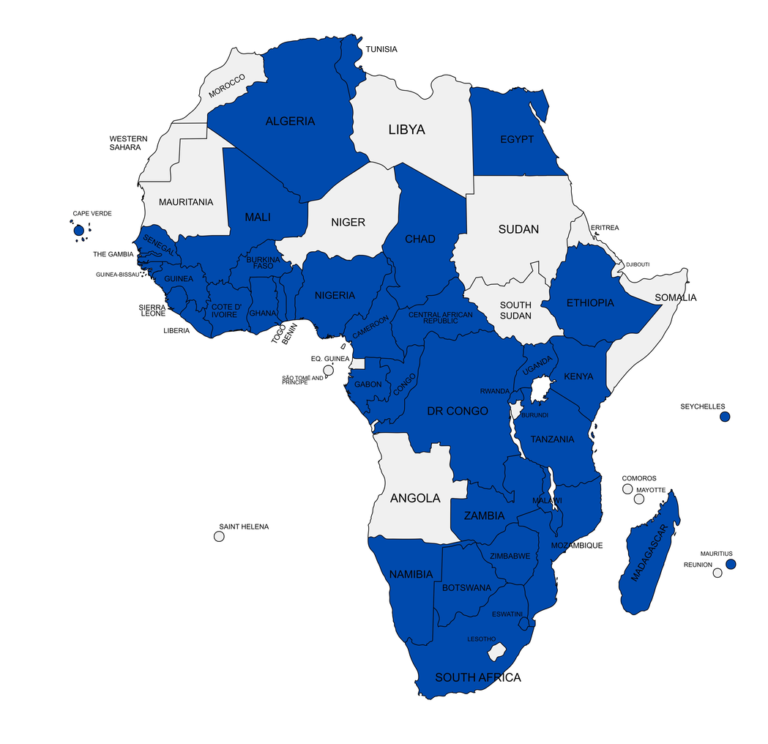
Get local coverage where you need it, packages start from the shown prices.
No need to switch networks or buy multiple local SIMs. Your connection follows you wherever you go.
Pick your plan and go. Your data activates the moment you touch down, so you’re connected before you even leave the plane.
Travel without worrying about hidden fees. All plans are prepaid, fixed-price, and fully transparent
Need help? Our support team is available anytime, anywhere. Get instant assistance through WhatsApp whenever you need it.
Your Loyalty Pays Off
Create an account to track your data in real-time, including quicker reordering and top ups. Get access to member-only perks.
An eSIM (embedded SIM) is a digital SIM card that is built directly into your device’s hardware. Instead of swapping a physical plastic card, you download a digital profile. The NuuTel eSIM which allows your device to connect to a local mobile network for data. It functions exactly like a traditional SIM but is entirely digital.
Most modern smartphones, tablets, and some laptops manufactured since 2018 support eSIM technology.
Installation is quick and requires a stable internet connection (Wi-Fi or cellular data). Please note that to ensure you receive the best coverage, our official eSIM technology partner is Airalo. While your service is provided through us, you may see the Airalo name appear during the installation process or within your device’s network settings.
1. Via QR Code (Recommended):
2. Via Manual Entry:
Follow the same steps, but choose Enter Details Manually and input the SM-DP+ address and Activation Code provided by NuuTel.
This depends on the plan’s activation policy:
Always check the ‘Additional Information’ section for your specific plan’s activation policy.
Yes, in fact, we recommend it! You can install the eSIM profile while you are still at home with a reliable Wi-Fi connection. However, only activate the line in your phone’s settings when you are ready to start using the data (or when you land, depending on the policy).
Absolutely. With Dual SIM technology, you can:
This allows you to receive important calls/texts on your primary number while using the affordable NuuTel data plan.
You have two options:
It depends on the plan you purchase:
Yes, most NuuTel plans support tethering, allowing you to share your mobile data connection with other devices like laptops or tablets. Check the specific plan details to confirm.
We strive to provide timely assistance to all our customers. Our support team operates on a best endeavours basis; while we do not guarantee a specific 24-hour window, we are committed to investigating and resolving all technical queries as quickly as possible to minimise any disruption to your travel.
NuuTel uses cookies to ensure our website works securely, to understand how you use our site, and to show you relevant eSIM offers. By clicking "Accept All", you agree to the storing of cookies on your device to enhance site navigation and assist in our marketing efforts. You can choose to "Reject Non-Essential" cookies or customize your choices via "Manage Preferences"